RISMedia
  • News
  • Premier
  • Reports
  • Events
  • Power Broker
  • Newsmakers
  • More
    • Publications
    • Education
No Result
View All Result
  • Agents
  • Brokers
  • Teams
  • Marketing
  • Coaching
  • Technology
  • More
    • Headliners New
    • Luxury
    • Best Practices
    • Consumer
    • National
    • Our Editors
Join Premier
Sign In
RISMedia
  • News
  • Premier
  • Reports
  • Events
  • Power Broker
  • Newsmakers
  • More
    • Publications
    • Education
No Result
View All Result
RISMedia
No Result
View All Result

Creating a Custom Display in Matrix

Home News
February 25, 2009, 9 pm
Reading Time: 2 mins read

By Diane Ives, CRB, CRS, and MRIS Instructor

MRIS, March 2, 2009-When using Matrix, you may want to see different information on your screen. It is possible to do this through the creation of a custom display.

To create a custom display, click on the My Matrix Tab and click the Custom Display link.

1. Click in the box Table type: select listing
2. Click in the box Table: select Residential
3. Click blue Add button
4. Click in the box called Display Name and type a name for your custom display.
Think about what information you want to see on the screen when you look at listings in Matrix. Find the column name under the Available Residential Columns dialogue box. Click on that column name; click the Add button to move it to the right.

You can do the same for any other column names you would like to create.
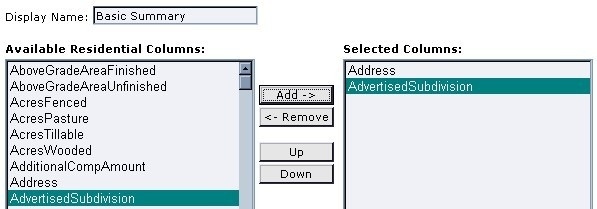
image-for-mris-enews-3-2-09doc

Reorder the fields.

As you look at the Selected Columns, the fields that you see from top to bottom will display from left to right on the Matrix Search Result screen. Click on a field that you wish to move in Selected Columns box. Click the up or down button. Click until the field is in the location that you desire. Repeat the process with other columns as necessary.

Re-name and Re-size fields

Click on Address in the Selected Columns box. On the right, in the width box you will see the recommended width, displayed in pixels. This may be changed if you want the column to appear wider or narrower.
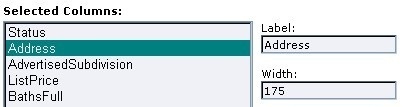
image-2-for-mris-enews-3-2-09doc

In addition, if you would like to rename a column name, click to highlight a field, click in the Label box delete what’s there and type the name you would like. Scroll to the bottom click the blue Save button.

To send feedback on this article, email communications@mris.net.

ShareTweetShare
Beth McGuire

Beth McGuire

Recently promoted to Vice President, Online Editorial, Beth McGuire oversees the editorial direction and content of RISMedia’s websites, and its daily, weekly and monthly newsletters. Through her two decades with the company, she has also contributed her range of editorial and creative skills to the company’s publications, content marketing platforms, events and more.

Related Posts

Brands By Integra Appoints Industry Veteran Dan Firda CEO
Agents

Brands By Integra Appoints Industry Veteran Dan Firda CEO

June 8, 2026
realtracs
Agents

Realtracs Still in Negotiations With Zillow as Deadline Passes

June 8, 2026
Court
Agents

COURT REPORT: New York Attorney General Investigating Compass Over Antitrust Concerns

June 8, 2026
Bright MLS Chief Economist Lisa Sturtevant to Provide Economic Update at RISMedia’s CEO Exchange
Agents

Bright MLS Chief Economist Lisa Sturtevant to Provide Economic Update at RISMedia’s CEO Exchange

June 8, 2026
Realtor.com Launches RealAssist Conversational Home-Search Experience
Agents

Realtor.com Launches RealAssist Conversational Home-Search Experience

June 8, 2026
agents
Agents

What are the Most Successful Brokerages Getting Right Today?

June 5, 2026
Tip of the Day

How to Calm Jittery Sellers When Similar Homes Close by Are Also for Sale

While you as the seller’s agent or broker understand all the intricacies and strategies of working a listing, your clients very likely are first-timers, vulnerable to emotions and worrisome opinions precisely because they don’t have prior experience. Read more.

Business Tip of the Day provided by

Recent Posts

  • Major Upgrades Announced for RISMedia’s CEO & Leadership Exchange
  • Brands By Integra Appoints Industry Veteran Dan Firda CEO
  • From Team Leader to Brokerage Leader: More Similar Than You Think

Categories

  • Spotlights
  • Best Practices
  • Advice
  • Marketing
  • Technology
  • Social Media

The Most Important Real Estate News & Events

Click below to receive the latest real estate news and events directly to your inbox.

Sign Up
By signing up, you agree to our TOS and Privacy Policy.

About Blog Our Products Our Team Contact Advertise/Sponsor Media Kit Email Whitelist Terms & Policies ACE Marketing Technologies LLC

© 2026 RISMedia. All Rights Reserved. Design by Real Estate Webmasters.

No Result
View All Result
  • Home
  • Premier
  • Reports
  • News
    • Agents
    • Brokers
    • Teams
    • Consumer
    • Marketing
    • Coaching
    • Technology
    • Headliners New
    • Luxury
    • Best Practices
    • National
    • Our Editors
  • Publications
    • Real Estate Magazine
    • Past Issues
    • Custom Covers
  • Events
    • Upcoming Events
    • Podcasts
    • Event Coverage
  • Education
    • Get Licensed
    • REALTOR® Courses
    • Continuing Education
    • Luxury Designation
    • Real Estate Tools
  • Newsmakers
    • 2026 Newsmakers
    • 2025 Newsmakers
    • 2024 Newsmakers
    • 2023 Newsmakers
    • 2022 Newsmakers
    • 2021 Newsmakers
    • 2020 Newsmakers
    • 2019 Newsmakers
  • Power Broker
    • 2026 Power Broker
    • 2025 Power Broker
    • 2024 Power Broker
    • 2023 Power Broker
    • 2022 Power Broker
    • 2021 Power Broker
    • 2020 Power Broker
    • 2019 Power Broker
  • Join Premier
  • Sign In

© 2026 RISMedia. All Rights Reserved. Design by Real Estate Webmasters.

X
No Result
View All Result
  • Home
  • Premier
  • Reports
  • News
    • Agents
    • Brokers
    • Teams
    • Consumer
    • Marketing
    • Coaching
    • Technology
    • Headliners New
    • Luxury
    • Best Practices
    • National
    • Our Editors
  • Publications
    • Real Estate Magazine
    • Past Issues
    • Custom Covers
  • Events
    • Upcoming Events
    • Podcasts
    • Event Coverage
  • Education
    • Get Licensed
    • REALTOR® Courses
    • Continuing Education
    • Luxury Designation
    • Real Estate Tools
  • Newsmakers
    • 2026 Newsmakers
    • 2025 Newsmakers
    • 2024 Newsmakers
    • 2023 Newsmakers
    • 2022 Newsmakers
    • 2021 Newsmakers
    • 2020 Newsmakers
    • 2019 Newsmakers
  • Power Broker
    • 2026 Power Broker
    • 2025 Power Broker
    • 2024 Power Broker
    • 2023 Power Broker
    • 2022 Power Broker
    • 2021 Power Broker
    • 2020 Power Broker
    • 2019 Power Broker
  • Join Premier
  • Sign In

© 2026 RISMedia. All Rights Reserved. Design by Real Estate Webmasters.