By Diane Ives, CRB, CRS, and MRIS® Instructor
MRIS, Nov. 17, 2008-When using Matrix, you may want to see different information on your screen. It is possible to create a custom display.
To create a custom display, click on the My Matrix Tab, click the Custom Display link.
1. Click in the box Table type: select listing
2. Click in the box Table: select Residential
3. Click blue Add button
4. Click in the box called Display Name and type a name for your custom display.
Think about what information you want to see on the screen when you look at listings in Matrix. Find the column name under the Available Residential Columns dialogue box. Click on that column name; click the Add button to move it to the right.
Do the same for any other column names you wish, such as AdvertisedSubdivison, BathsFull, BathsHalf, Bedrooms, DOMP, Levels, ListPrice, and Status.
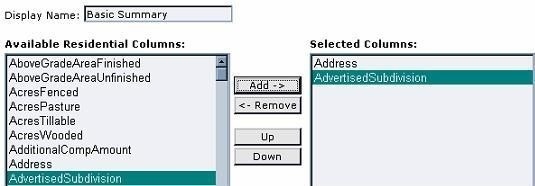
Reorder the fields. As you look at the Selected Columns, the fields that you see from top to bottom will display from left to right on the Matrix Search Result screen.
Click on a field that you wish to move in Selected Columns box. Click the up or down button. Click until the field is in the location that you desire. Repeat the process with other columns as necessary.
Re-name and Re-size fields
Click on Address in the Selected Columns box. On the right, in the width: box you will see the recommended width, displayed in pixels. This may be changed if you want the column to appear wider or narrower.
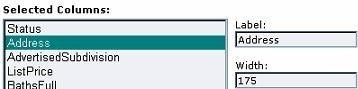
If you would like to rename a column name, click to highlight a field, click in the Label box delete what’s there and type the name you would like. Scroll to the bottom click the blue Save button.
To send feedback on this article, e-mail communications@mris.net.